
# Spring Boot & App Insights
参考文档:https://docs.microsoft.com/en-us/azure/azure-monitor/app/java-get-started (opens new window)
# 创建 Azure App Insights 资源
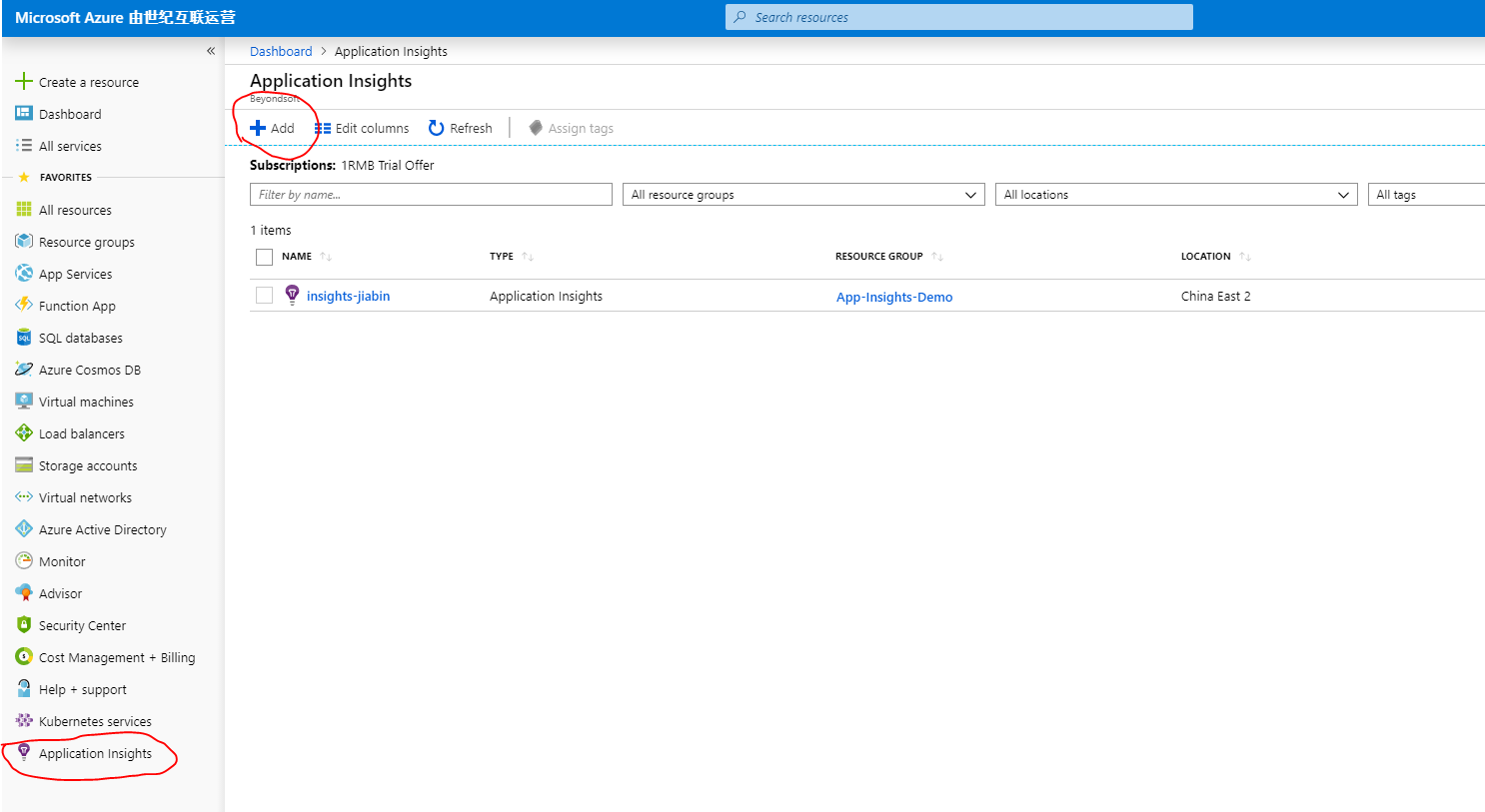
- 浏览到位于 https://portal.azure.cn/ (opens new window) 的 Azure(中国)门户,定位到 Application Insights,然后单击新建。
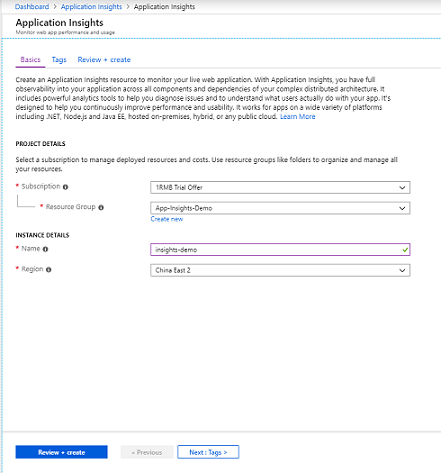
在新建资源上,指定以下信息:
- 选择订阅。
- 选择资源组。
- 输入资源名称。
- 选择资源区域位置。
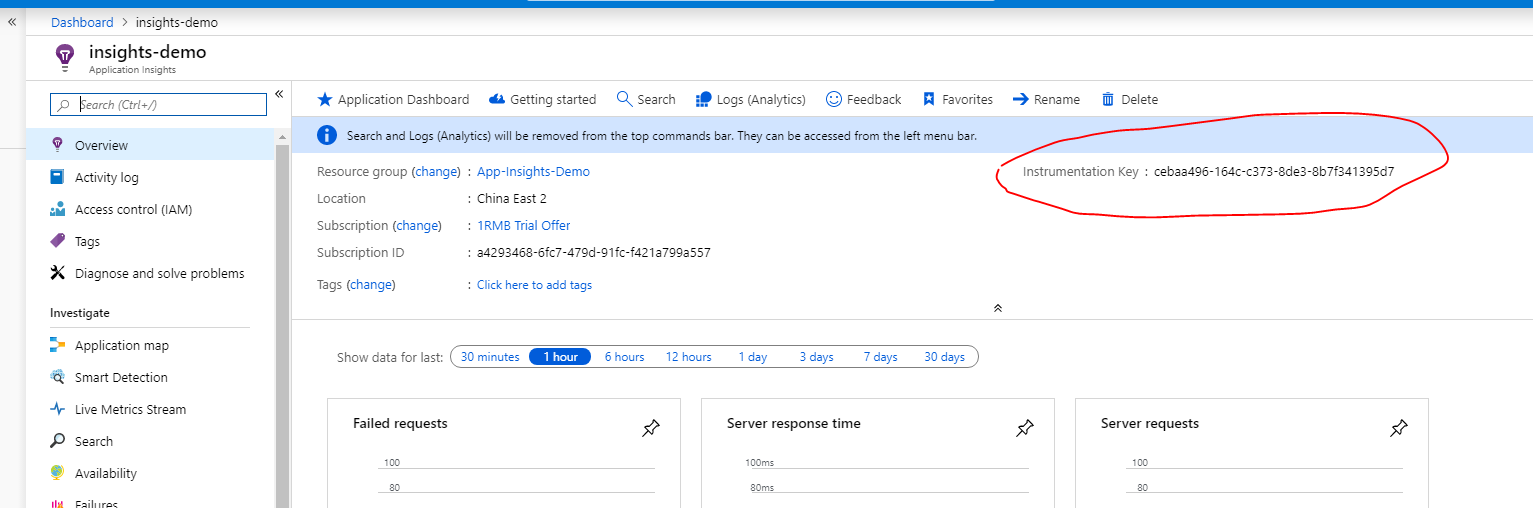
资源创建后,导航到详情页面,可以查询到该 App Insights 的检测密钥。
# 将 Spring Boot 应用程序配置为使用 App Insights
- 在项目的 POM.xml 文件中添加以下依赖项。
<dependency>
    <groupId>com.microsoft.azure</groupId>
    <artifactId>applicationinsights-spring-boot-starter</artifactId>
    <version>1.2.0-BETA</version>
</dependency>
- 在项目的 application.properties 文件中添加以下属性(如果是yaml文件需要转换成层级结构)。
此处为中国版的 Azure,与国际版的有所不同,需要设置专有的 endpoint,获取更多关于 endpoint (opens new window) 的相关配置。有关其余更详细的配置信息,请查看 https://github.com/Microsoft/ApplicationInsights-Java/blob/master/azure-application-insights-spring-boot-starter/README.md (opens new window)
# Specify the instrumentation key of your Application Insights resource.
azure.application-insights.instrumentation-key=[your ikey from the resource]
azure.application-insights.channel.in-process.endpoint-address=https://dc.applicationinsights.azure.cn/v2/track
# Specify the name of your springboot application. This can be any logical name you would like to give to your app.
spring.application.name=[your app name]
- 在代码中引用 TelemetryClient 对象 主动 发送日志信息到 App Insights,以下为示例代码。
package com.example.demo;

import com.microsoft.applicationinsights.TelemetryClient;
import java.io.IOException;
import org.springframework.beans.factory.annotation.Autowired;
import org.springframework.web.bind.annotation.GetMapping;
import org.springframework.web.bind.annotation.RequestMapping;
import org.springframework.web.bind.annotation.RestController;
import com.microsoft.applicationinsights.telemetry.Duration;

@RestController
@RequestMapping("/sample")
public class TestController {

    @Autowired
    TelemetryClient telemetryClient;

    @GetMapping("/hello")
    public String hello() {

        //track a custom event
        telemetryClient.trackEvent("Sending a custom event...");

        //trace a custom trace
        telemetryClient.trackTrace("Sending a custom trace....");

        //track a custom metric
        telemetryClient.trackMetric("custom metric", 1.0);

        //track a custom dependency
        telemetryClient.trackDependency("SQL", "Insert", new Duration(0, 0, 1, 1, 1), true);

        return "hello";
    }
}
# 将 Springboot 应用程序配置为向 Application Insights 自动发送 log4j 日志
如果日志系统采用的是 Logback,请参照另外的配置,https://docs.microsoft.com/zh-cn/azure/azure-monitor/app/java-trace-logs (opens new window)
- 修改项目的 POM.xml 文件,添加/修改如下 dependency 节。
<dependencies>
    <dependency>
        <groupId>org.springframework.boot</groupId>
        <artifactId>spring-boot-starter-web</artifactId>
        <exclusions>
            <exclusion>
                <groupId>org.springframework.boot</groupId>
                <artifactId>spring-boot-starter-logging</artifactId>
            </exclusion>
        </exclusions>
    </dependency>

    <dependency>
        <groupId>org.springframework.boot</groupId>
        <artifactId>spring-boot-starter-test</artifactId>
        <scope>test</scope>
    </dependency>

    <dependency>
        <groupId>org.springframework.boot</groupId>
        <artifactId>spring-boot-starter-log4j2</artifactId>
    </dependency>

    <dependency>
        <groupId>com.microsoft.azure</groupId>
        <artifactId>applicationinsights-spring-boot-starter</artifactId>
        <version>1.2.0-BETA</version>
    </dependency>

    <dependency>
        <groupId>com.microsoft.azure</groupId>
        <artifactId>applicationinsights-logging-log4j2</artifactId>
        <version>2.1.1</version>
    </dependency>
</dependencies>
- 修改 log4j2.xml 的配置,添加新的 Appender。注意给 Appender 添加日志的记录级别,筛选掉应用程序不必要的日志,这里设置为
level="info"。(这么做的原因是免费版的 Azure App Insights 记录日志的内存每天都有一定的限制,如果超出了限制,日志就进不到 App Insights 里了,而且程序也不会抛异常)
<?xml version="1.0" encoding="UTF-8" ?>
<Configuration packages="com.microsoft.applicationinsights.log4j.v2">
  <Properties>
    <Property name="LOG_PATTERN">
      %d{yyyy-MM-dd HH:mm:ss.SSS} %5p ${hostName} --- [%15.15t] %-40.40c{1.} : %m%n%ex
    </Property>
  </Properties>
  <Appenders>
    <Console name="Console" target="SYSTEM_OUT">
      <PatternLayout pattern="%d{HH:mm:ss.SSS} [%t] %-5level %logger{36} - %msg%n"/>
    </Console>
    <ApplicationInsightsAppender name="aiAppender">
    </ApplicationInsightsAppender>
  </Appenders>
  <Loggers>
    <Root level="trace">
      <AppenderRef ref="Console" level="info" />
      <AppenderRef ref="aiAppender" level="info" />
    </Root>
  </Loggers>
</Configuration>
运行应用程序且等待一段时间后,在 Azure 的管理页面的 App Insights 资源就可以查看到对应log4j的日志信息。
如果 java jdk 的版本过高,可能会遇到程序运行失败的情况(大概是因为 Java SE 9.0 中不再包含 Java EE 的指定包,参考 https://blog.csdn.net/hadues/article/details/79188793 (opens new window)),此时需要在 POM.xml 中添加如下依赖项
<dependency>
    <groupId>javax.xml.bind</groupId>
    <artifactId>jaxb-api</artifactId>
    <version>2.2.8</version>
</dependency>